Buying Guides
A smart plug setup for renters: what to automate first and what to leave alone
For a rented flat, the right smart-home order is plug first, voice second, lighting last, and anything you cannot unplug without asking permission last of all.
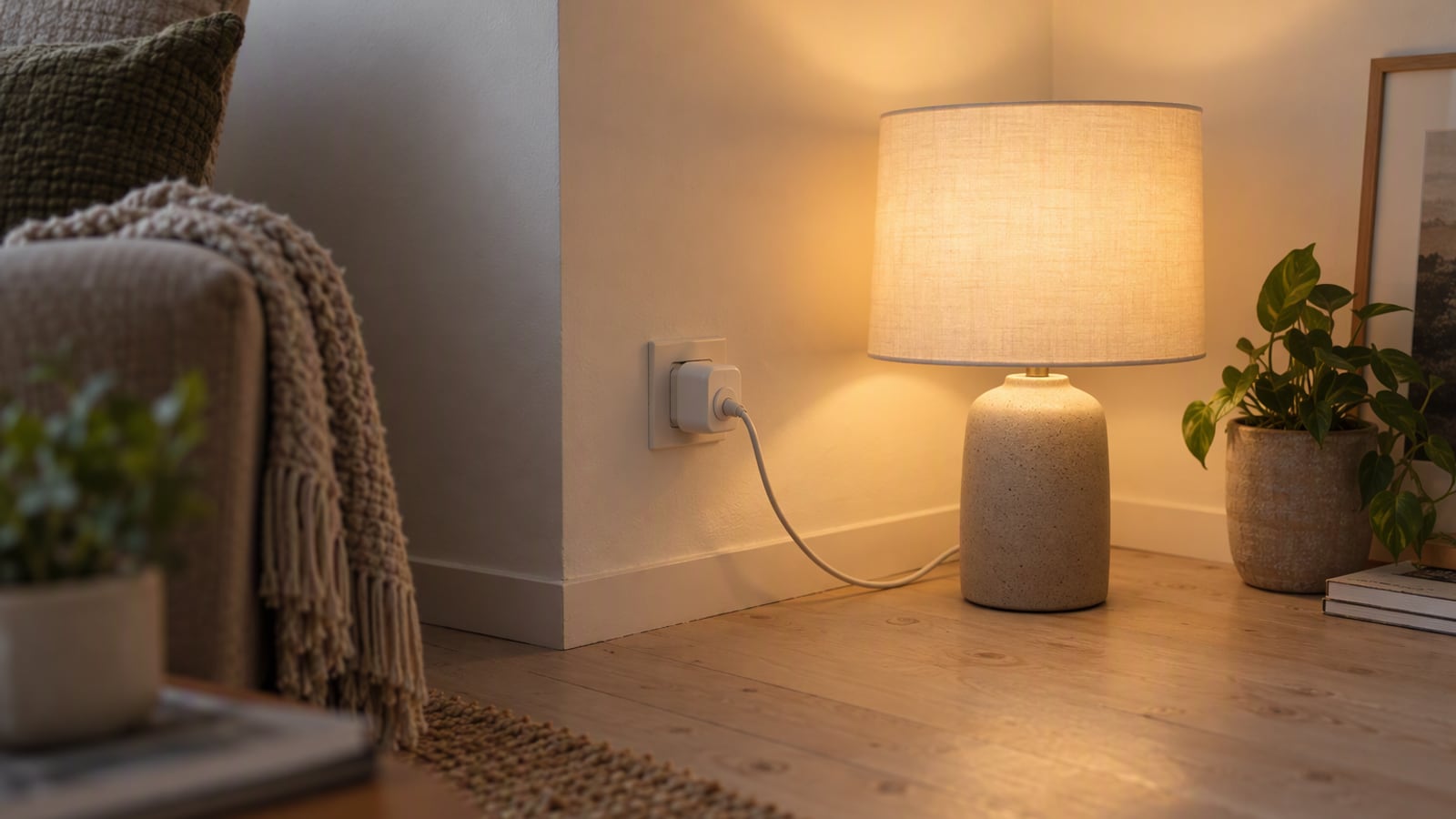
A rented flat has a particular relationship with technology. You cannot rewire anything, you cannot mount a panel on the wall, and the person who owns the building has opinions about holes. Everything you buy has to be either removable in seconds or cheap enough to leave behind without regret. That constraint is usually treated as a limitation, and it is actually a useful design brief.
The good news is that the most useful smart-home automation a renter can buy is also the cheapest. A table lamp on a smart plug does more for daily life than almost anything else in the category: it turns the lights on before you get home, it puts the room to sleep on a schedule, and it can be unplugged and dropped into a bag when the tenancy ends. Everything else is optional, and a surprising amount of it is not worth buying at all.
This guide is written from published specifications, manufacturer documentation and the patterns that recur in owner reports. ZeroToUs has not measured any device and has not installed these products. Where a manufacturer makes a claim, we attribute it as a claim.
How we picked
We did not test these devices. We have not measured energy use, timed automations, or listened to any speaker run. What we can do honestly is choose products using criteria that actually apply to a renter, which are different from the criteria that matter to a homeowner.
The first criterion is reversibility. A device that can be unplugged, unscrewed or packed in a box is a device a renter can buy without a conversation. Anything that touches wiring or the fabric of the building fails this test immediately.
The second is whether it works without a subscription and without a hub. Renters move, budgets are tight, and a system that stops working when a subscription lapses is a poor investment. We favoured devices that do their job on their own.
The third is whether it solves a daily annoyance. Automating something you do once a month is a hobby. Automating the lamp you turn on every evening, or the appliance you forget to switch off, is a genuine improvement in how the flat works.
Where a product has an obvious weakness, we say so. A guide that recommends everything equally is not a guide.
The short list
- TP-Link Tapo P110 — the starting point, and often the whole setup: a Wi-Fi plug with no hub, no subscription and energy monitoring.
- Philips Hue starter kit — the upgrade for anyone who wants dimming and colour across several fittings, and who values a hub that keeps working when the internet drops.
- Amazon Echo Dot (5th gen) — the cheap voice layer that turns both of the above into something you can operate with your hands full.
How to choose
Automate the lamp before you automate anything else. The single best first purchase is a smart plug for the lamp you already own. It needs no new bulb, no wiring and no permission, and it delivers the one automation people actually notice: the light is on when you walk in.
Prefer devices that work without a hub until you need one. A Wi-Fi plug does its job alone, which suits a rental. A hub-based lighting system is worth adding once you want schedules across several rooms and want the lights to keep working when the internet drops. Buy the hub when you have a reason for it, not before.
Check what happens when the internet goes down. A plug or a bulb that depends entirely on a cloud service will stop obeying its schedule during an outage. A hub-based system keeps its routines running locally, which matters if your connection is unreliable or shared with neighbours.
Buy for the flat you will move into, not just the one you are in. Bulbs in standard fittings and plugs in standard sockets move with you. Anything that assumes a particular layout or a landlord’s consent does not, and the most portable setup is the one you can rebuild in an afternoon.
Decide what you will leave behind. A cheap plug is easy to walk away from; a hub-based lighting system is not. That asymmetry should shape how much you invest in each layer.
What not to overpay for
The first thing not to overpay for is a hub you do not need yet. If your goal is one lamp on a schedule, a Wi-Fi plug with no hub and no subscription does the entire job. Adding a hub-based system before you have several fittings to control means paying for capability that sits unused on a shelf.
The second is colour lighting as a first purchase. Colour is the most visible feature of smart lighting and the least used. Warm white dimming and a schedule deliver most of the daily value and cost less, so treat colour as an upgrade once the basics are in place.
The third is a subscription. Energy monitoring and scheduling on a good cheap plug are available without one, and a system whose useful features sit behind a monthly fee is a poor fit for a rental budget.
The fourth is voice hardware you will not talk to. A cheap speaker is a genuinely useful kitchen timer and radio, and it is also a device that some people simply never use. Buy it because you want hands-free control or kitchen audio, not because a smart-home checklist told you to.
TP-Link Tapo P110: automate a lamp first
The Tapo P110 is the first thing a renter should buy, and for many flats it is the only thing they need. TP-Link specifies a Wi-Fi plug that requires no hub and no subscription, supports schedules and timers, works with Alexa and Google, and reports energy use so you can see what an appliance really costs to run. It is also small enough not to block the second wall socket, which matters in a flat where outlets are scarce.
The strengths are the ones a renter cares about. There is nothing to install, nothing to wire and nothing to ask permission for. The plug goes into the socket, the lamp goes into the plug, and the whole thing unplugs and travels when the tenancy ends. Energy monitoring is a bonus that turns out to be genuinely useful for anyone wondering what an old fridge or a space heater is costing them.
The tradeoffs are real. It is a Wi-Fi device, so it depends on your router, and if the connection drops, the cloud features go with it. The app is also functional rather than pleasant. Neither flaw changes the recommendation for a first purchase, because at this price the bar is simply whether it automates the lamp.
Buy it if you want the cheapest useful automation in a rental, or you want to track what an appliance costs to run. Skip it if your router is unreliable and you need schedules that survive an outage, in which case a hub-based system is the better foundation.
Philips Hue starter kit: the upgrade once you want dimming
Hue is the second step, not the first, and it is worth buying once you want dimming, colour or schedules across several fittings. Philips Hue specifies a starter kit built around the Hue Bridge hub, with bulbs that work across Matter, HomeKit, Alexa and Google, a Zigbee mesh that strengthens as you add bulbs, and dimmable colour bulbs.
Two things make it a good fit for a renter specifically. The bulbs screw into standard fittings, so they move with you and need no landlord’s consent, and the hub keeps schedules running locally when the internet drops. The platform list is the other advantage: in a shared flat where one person has an iPhone and another has Android, the lights do not belong to either phone, so nobody is locked out and nothing breaks when a housemate moves on.
The costs are equally clear. Hue is expensive per bulb compared with Wi-Fi rivals, and the hub is required for the features people want, including schedules and automations, which means an extra box to power and place. If you want one bulb in one lamp, a cheap Wi-Fi plug with an ordinary bulb does the same job for far less.
Buy it if you are lighting several rooms, you mix iPhone and Android in the household, or you want lights that keep their routine during an internet outage. Skip it if you only want one lamp automated, or you do not want a hub on a shelf.
Amazon Echo Dot (5th gen): the cheap voice layer
The Echo Dot is the optional third piece, and it is best understood as a voice interface rather than as smart-home infrastructure. Amazon specifies a compact speaker with a built-in temperature sensor, a 3.5mm line out and Matter controller capability. In a rental it earns its place as a kitchen device: timers while you cook, a podcast in the background, and hands-free control of the lamp and the lights you have already automated.
The temperature sensor is the underrated part. It gives you a reading of the room without a separate device, which is useful in a flat with uneven heating or a bedroom that runs cold. Its ability to act as a Matter controller also means it can sit at the centre of other devices.
Its limits are sound and service ties. The speaker is fine for podcasts and kitchen radio and collapses if you push the volume, so it is not a substitute for a real speaker. Some features are also tied to Amazon’s services, which is worth knowing before you build a routine around them.
Buy it if you want hands-free control and a kitchen timer, or you want a cheap temperature reading in a room. Skip it if you want proper sound, or you would rather not add a voice assistant to the flat at all.
Frequently asked questions
What should I automate first in a rented flat? A table lamp on a smart plug. It is the cheapest, most reversible and most immediately useful automation available to a renter, because it needs no wiring, no landlord and no permission, and it can be unplugged and taken to the next place.
Will a landlord notice smart plugs or smart bulbs? A smart plug in a wall socket is visible but removable in seconds, and a smart bulb in a standard fitting is equally reversible. Neither changes the property. Anything requiring wiring, a wall-mounted panel or a fixture swap is a different conversation entirely.
Do I need a hub for a smart plug? No. The TP-Link Tapo P110 is a Wi-Fi plug that needs no hub and no subscription, and it reports wattage as well. That makes it the simplest starting point for a rental, though it does depend on your router.
Should I buy smart bulbs or smart plugs first? Buy the plug first, because it automates whatever lamp you already own for a fraction of the cost. Move to smart bulbs once you want dimming, colour or a schedule across several fittings, at which point a hub-based system becomes worth the money.
The products in this article
Destinations and specification notes were last checked on 2026-10-06. Prices change constantly, so always confirm on the brand's own page before buying.
Best cheap smart plug that still reports energy use
TP-Link Tapo P110 Smart Plug TP-Link
Best for
Verified specifications
- Wi-Fi, no hub required
- Energy monitoring
- Schedules and timers
- Works with Alexa and Google
What works
- No hub, no subscription, and it reports wattage
- Small enough not to block the second wall socket
- Cheap enough to buy several at once
What does not
- Wi-Fi rather than Zigbee, so it depends on your router
- The app is functional rather than pleasant
Best smart lighting that outlives one ecosystem
Philips Hue Starter Kit Philips Hue
Best for
Verified specifications
- Hue Bridge hub included
- Works with Matter, HomeKit, Alexa and Google
- Zigbee mesh
- Dimmable colour bulbs
What works
- The hub keeps schedules running locally when the internet drops
- Bulbs keep working if you switch phone platforms
- The largest third-party accessory range of any lighting system
What does not
- Expensive per bulb compared with Wi-Fi rivals
- Requires the hub for the features people actually want
Best cheap voice control for a kitchen
Amazon Echo Dot (5th gen) Amazon
Best for
Verified specifications
- Compact speaker
- Temperature sensor
- Matter controller
- 3.5mm line out
What works
- Good enough sound for podcasts and kitchen radio
- Built-in temperature sensor is genuinely useful
- Acts as a Matter controller for other devices
What does not
- Sound quality collapses if you push the volume
- Some features are tied to Amazon services
Sources
More from Smart Home
 Smart Home
Philips Hue starter kit review: the smart lighting that survives a mixed-platform household
The Hue starter kit costs more per bulb than any Wi-Fi rival, and it is the only lighting system here that survives both a platform switch and an internet outage.
 Audio
AirPods Pro 3 vs Sony WF-1000XM5: which earbuds for a genuinely loud commute
Both of these earbuds are excellent, and the choice between them is decided by the phone in your pocket long before you reach the specification table.
 Wearables
Apple Watch Series 11 vs Garmin Venu 3: smartwatch or sports watch
These two watches are not rivals so much as different answers to the same question: do you want a phone on your wrist, or a coach that lasts a fortnight?